Ashadiya: A Script Font for Creative Web Design
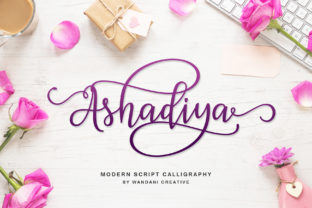
As a web designer, I’m always on the lookout for fonts that can elevate a site’s visual identity without sacrificing readability. Ashadiya has quickly become one of my go-to choices for adding a touch of elegance and personality to digital projects. Its bold swashes and flowing curves bring a sense of warmth and artistry that feels both modern and timeless.
Testing Ashadiya in a Hero Section
I recently used Ashadiya in a hero section for a boutique online store. The font’s dramatic strokes and decorative details made the headline stand out against a minimalist background. It added a sense of luxury that matched the brand’s aesthetic perfectly. The font worked well at larger sizes, where its intricate details could shine without becoming overwhelming.
One thing I noticed was how Ashadiya handles spacing. It doesn’t feel cramped or too loose, which is essential when working with limited space on a website. Whether it was a heading or a call-to-action button, the font maintained a clean and professional look.
Responsive Design and Mobile Performance
On mobile devices, Ashadiya still holds up well. I tested it on smaller screens and found that it remains legible even at reduced sizes. The font’s structure allows it to scale gracefully, making it a good choice for headers and subheadings across different screen sizes.
However, I wouldn’t recommend using Ashadiya for body text. Its ornate style is better suited for display purposes rather than long paragraphs. When paired with a simple sans-serif font like Open Sans or Lato, it creates a balanced and visually appealing layout that’s easy on the eyes.
Pairing Ashadiya with Clean Typography
Font pairing is key when working with a script font like Ashadiya. I often pair it with a clean, neutral typeface to create contrast and improve readability. For example, using Ashadiya for a heading and a sans-serif font for the body copy gives the design a modern, professional edge while keeping the focus on the message.
Another effective pairing is with a serif font. This combination adds depth and sophistication, making it ideal for editorial websites, portfolio pages, or content-heavy blogs. The contrast between the two fonts helps guide the user’s eye through the content without feeling jarring or unbalanced.
Using Ashadiya in Call-to-Action Buttons
For a recent project, I experimented with Ashadiya in a CTA button. The font’s bold swashes gave the button a unique, handcrafted feel that stood out from more standard options. It worked especially well on dark backgrounds, where the white strokes popped against the color.
That said, I’d advise caution when using Ashadiya in small buttons or on light backgrounds. The font’s details can get lost or appear too delicate, which might not be ideal for high-traffic areas of a website. In those cases, a simpler, more readable font would be a better fit.
Webfont Availability and Licensing
Before implementing Ashadiya on any website, it’s important to check the available file formats and licensing terms. The font comes in multiple weights and styles, which makes it versatile for different design needs. For commercial use, make sure the license covers your intended application—whether it’s for your own site or a client project.
Web designers should also consider performance when using custom fonts. Ashadiya is a premium font, so including it in a site’s CSS may affect load times. To mitigate this, I recommend using only the necessary weights and optimizing the font files for the web.
When Ashadiya Isn’t the Best Choice
While Ashadiya excels in certain contexts, it’s not a one-size-fits-all solution. I’ve found that it doesn’t perform well in accessibility-heavy interfaces, such as forms or navigation menus. Its decorative nature can make it harder to read for users with visual impairments or in low-light conditions.
Additionally, Ashadiya isn’t ideal for dense layouts or content-heavy pages. If you’re designing a dashboard, an admin panel, or a product listing with lots of text, a simpler, more functional font would be a better choice. That said, it can still serve as a great accent or highlight in these designs.
Final Thoughts on Ashadiya
Ashadiya is a powerful tool for web designers looking to add a personal, artistic touch to their projects. Its bold swashes and elegant curves make it perfect for headlines, logos, and decorative elements. With the right pairing and thoughtful implementation, it can transform a website’s visual identity and enhance the user experience.