Feeling Lovely: A Stylish Script Font for Web Design
Testing Feeling Lovely in a new website project felt like discovering a hidden gem. As a web designer, I'm always on the lookout for fonts that bring personality without sacrificing usability. Feeling Lovely, with its elegant calligraphy style, fit perfectly into a boutique online store I was building for a client who wanted a modern yet refined look.
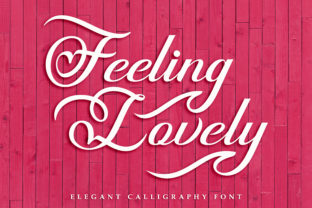
The font has a varying baseline that gives it a natural, handwritten feel. It’s not too ornate, which makes it ideal for digital use. The strokes are clean and consistent, making it easy to read even at smaller sizes. It adds a touch of sophistication that feels both contemporary and timeless.
I first tried Feeling Lovely in the hero section of the site. The headline stood out against a minimalist background, drawing attention without overwhelming the viewer. It worked well with the overall design, creating a sense of elegance that matched the brand's identity. The font’s soft curves and fluid lines gave the page a warm, inviting vibe.
As I moved through the layout, I experimented with using Feeling Lovely for headings, buttons, and short phrases. It proved to be versatile enough for different elements but wasn’t suited for long blocks of text. That’s where pairing it with a simple sans serif font came in handy. The contrast made the design more balanced and easier to navigate.
One of the things I appreciated about Feeling Lovely is how it handles different backgrounds. On light backgrounds, it remained legible and didn’t get lost in the white space. On dark backgrounds or image overlays, it still held up well, though I adjusted the size and spacing to ensure clarity. For mobile screens, I kept the font size larger and used it sparingly to maintain readability.
For a creative portfolio, Feeling Lovely could be used as a logo or heading, adding a personal touch that reflects the designer’s style. In a coaching website, it could highlight key messages or testimonials, giving the content a more human and approachable feel. On a product landing page, it would work well for headlines and CTA buttons, guiding users through the conversion funnel with visual appeal.
When working on a blog redesign, I considered using Feeling Lovely for the header and subheadings. It brought a fresh, artistic energy to the site while maintaining a professional tone. Pairing it with a classic serif font for body copy created a harmonious balance that felt both modern and readable.
For an online shop, Feeling Lovely could be used in banners and promotional graphics. It adds a touch of luxury that aligns with premium products. When used in small buttons or icons, it still retained its charm without becoming too distracting. The font’s versatility made it a great choice for a variety of design elements.
One thing to keep in mind when using Feeling Lovely is the importance of font pairing. As a script handwritten font, it works best when paired with simpler typefaces that don’t compete. A clean sans serif or a subtle serif can provide the necessary contrast to make the design more functional and visually appealing.
Before implementing Feeling Lovely on any project, I always check the available styles, weights, and file formats. Ensuring that the font is available in webfont format and supports multilingual characters is essential, especially for international audiences. Understanding the licensing terms is also crucial, especially if the font will be used across multiple platforms or client projects.
Overall, Feeling Lovely is a strong choice for designers looking to add a touch of elegance to their digital projects. Its modern feel and elegant style make it suitable for a wide range of applications, from logos and headers to banners and promotional content. Whether you're working on a boutique store, a coaching website, or a creative portfolio, this font offers a stylish solution that enhances the overall user experience.
As a web designer, I’ve found that choosing the right font can significantly impact the success of a project. Feeling Lovely not only looks good but also functions well in a variety of digital contexts. Its ability to blend beauty with usability makes it a valuable addition to any design toolkit.
Whether you're building a new website or refreshing an existing one, considering Feeling Lovely as part of your typography strategy could help elevate your brand’s visual identity. With its unique character and practical application, it’s a font that stands out in the world of modern web design.